
The perfect online editor for your review process and for efficient translation management.

The perfect online editor for your review process and for efficient translation management.
Home » Technology » Review manager
Translation review and correction
In today’s globalised world, companies rely on efficient, top-quality translations in order to compete successfully on the international stage. Yet the translation process can often be time-consuming and costly. This is where our translation review tool, , the (p)review4client™, comes in.
As an online layout editor (p)review4client™ offers the option to review and correct translations directly in the layout. This enables a more efficient and easy translation process, saving valuable time and resources. At the same time, higher quality translations are achieved. For example, in the field of marketing translations or technical translations.
Are you interested in our services?
Do not hesitate to get in touch with us using the contact form. You can also contact us by telephone or book an online meeting – we look forward to receiving your enquiry!
Your advantages of (p)review4client™
Direct access via the Internet browser without installing any additional software.
Less correction loops through simple collaboration.
Direct editing in layout view minimises errors.
Your documents and data are secure thanks to HTTPS encryption, servers in Germany and private cloud infrastructure.
(p)review4client simplifies collaboration and thus dispenses with time-consuming review processes.
Comments and change requests are implemented directly in (p)review4client. This eliminates the need for time-consuming email correspondence.
Review translations in real-time and in the finished layout
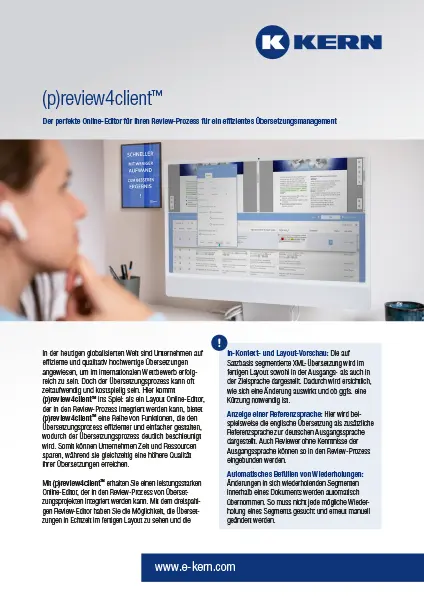
With (p)review4client™ you get a high-performance online editor that can be integrated into the review process of translation projects. The three-column review editor allows you to check your documents clearly and see translations in the final layout in real time.
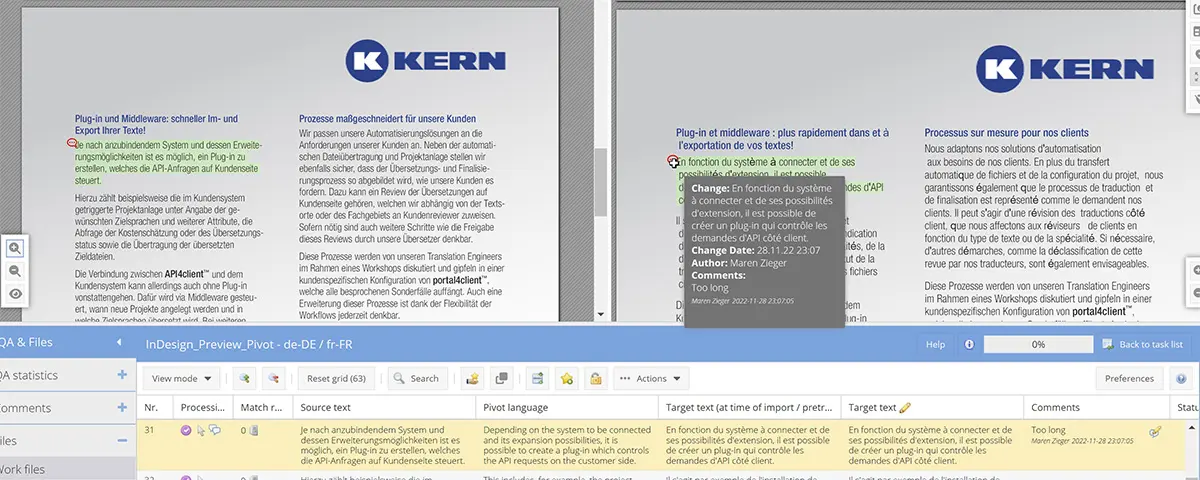
The XML translation segmented on a sentence-by-sentence basis is displayed in the finished layout both in the source and the target language.
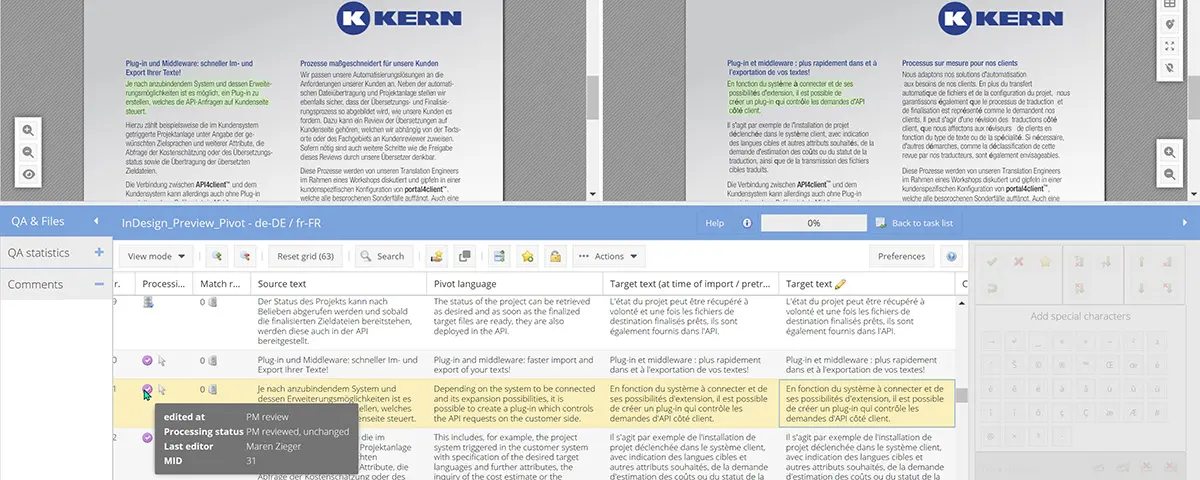
An additional reference language is displayed for the German source language. This means that reviewers who do not know the source language can also be integrated into the review process.
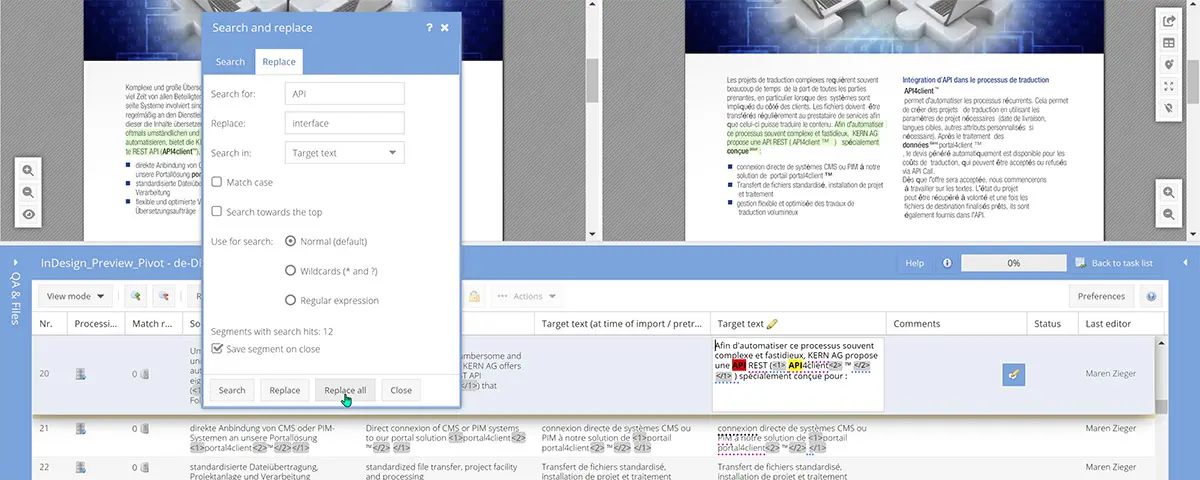
Changes to segments that repeat themselves within a document are automatically adopted. This means that not every repetition has to be changed manually again.
Translation review with (p)review4client™
With (p)review4client™, the workflow becomes simple and intuitive. The content to be translated is imported into the review editor from the web-based customer portal portal4client™ with translation memory export and, if necessary, industry-specific terminology. In (p)review4client™, a preview of the source text and translated content is then created, which allows the text to be viewed in the finished layout.
Two options are available here: allocation of the content to a layout source such as a PDF view or a website (URL) as well as dynamic generation of a layout with the help of a style sheet. This function allows you to directly visualise the translation in the finished layout.
Another feature is the display of a reference language, e.g. the English translation of the project from portal4client™ or a machine translation. In this way, the review task can be completed by persons who do not have any knowledge of the actual source language (e.g. German). After this, the file is reimported into portal4client™ in order to update the translation, and the target file is made available in the portal. This allows for even faster processing of your translation projects.
(p)review4client™
Thanks to the in-context preview and the option of dynamically generating the layout or allocating it to a layout source, it becomes easier to see the changes in the target language directly in the finished layout. This allows the changes to be processed faster and the text to be reviewed efficiently.
In addition, the option of displaying reference languages and adopting changes automatically in segments that repeat themselves means that access for reviewers is made easier and the time required for the translation process is reduced. In this way, translators and reviewers do not have to manually process each segment but can instead apply changes globally to a document with one click.
Our (p)review4client™ online editor offers you the following editing functions:
- Search and replace
- Track changes
- Comment function
- Display of the processing status
- Individual settings for repetitions
- Filter for repetitions
(p)review4client™ enables a more effective and faster translation process, saving time, money and resources, and improving translation quality. It is the perfect tool for efficient translation management.
(p)review4client™ – the online layout editor
The perfect online editor for your review process for efficient translation management.
FAQ about our (p)review4client™
Here you will soon find answers to the most important questions about (p)review4client™.
What is (p)review4client™?
(p)review4client™ is a browser-based online editor from KERN Global language services that allows translations to be checked and corrected directly in the final document layout — without installing any additional software.
How does (p)review4client™ simplify the translation review process?
With (p)review4client™, you can view the translation and the original simultaneously in layout view, insert comments and change requests directly, and correct errors immediately – significantly reducing the number of correction loops.
Which document types and layouts can be checked?
(p)review4client™ supports layout preview for different document types – such as PDFs or websites – and enables dynamic layout generation via stylesheets or the display of a layout source.
Can people who do not understand the source language also participate in the review?
Yes – with the option to display a reference language (e.g. an English translation), reviewers who do not know the source language can be involved in the review process.
How does (p)review4client™ support efficient teamwork?
The tool offers features such as commenting, “search and replace”, change tracking, and automatic transfer of repetitive segments – making the review workflow clearer, faster and less prone to errors.
How is data security ensured?
All documents are transferred via secure HTTPS connections and stored on servers in Germany or in a private cloud infrastructure — ensuring that your data remains confidential and protected.
Who is (p)review4client™ most suitable for?
(p)review4client™ is ideal for companies with extensive translation projects — such as technical documentation, marketing material, or multilingual publications — who want professional review in the final layout and want to save time and resources in the process.